
The Ultimate Guide to Homepage Design for Ecommerce in the United States
Online first impressions are as vital as they are in the real world. For web stores, the homepage plays the part of welcome mat, showroom, and brand spokesperson all in one. A polished homepage design for ecommerce is what draws visitors in, nudges them to products, and builds trust at the same time.
This easy-to-follow guide walks you through the steps to create a homepage design for ecommerce that grabs U.S. shoppers, lines up with SEO goals, and boosts your conversion numbers.
| # | Topic | Key Points | Practical Tips / Tools |
|---|---|---|---|
| 1 | Purpose of Homepage | First impression for shoppers, guides navigation, strengthens brand, increases sales | Keep it clean, mobile-friendly, and fast |
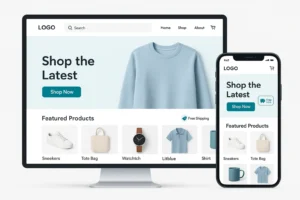
| 2 | Core Elements | Hero banner, navigation/search, featured products, trust signals, footer | Use clear CTAs and highlight seasonal promos |
| 3 | Best Practices | Prioritize mobile, optimize speed, balance text & visuals, highlight offers | Compress images, use whitespace, focus on key CTAs |
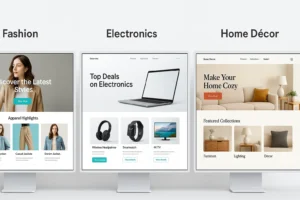
| 4 | Layout Ideas by Niche | Fashion: lifestyle images + new arrivals; Electronics: specs & CTAs; Home décor: warm imagery + reviews | Adapt homepage blocks to product category |
| 5 | Common Mistakes | Overloaded pop-ups, inconsistent images, hidden shipping/return info, ignoring mobile | Keep layouts simple and transparent |
| 6 | Advanced Tactics | Personalize returning visitor view, use video banners, A/B test CTAs, analyze clicks via heatmaps | Tools: Hotjar, Crazy Egg, Optimizely |
| 7 | SEO for Homepage | Use target keywords (e.g., homepage design for ecommerce, eshop design), alt text, descriptive anchors, fast loading | Link internally to product & blog pages |
| 8 | Tools for Building Homepages | Shopify (drag & drop), WooCommerce + Elementor, Squarespace, Adobe XD/Figma | Pick based on customization needs and ease |
| 9 | Case Studies | Glossier (minimal focus), Warby Parker (mission-driven CTAs), Allbirds (eco branding) | Study top brands for layout and messaging |
| 10 | Future Trends | AI recommendations, voice search, interactive storytelling, dark mode, one-click checkout | Monitor new features in ecommerce platforms |
| 11 | Psychology Tips | Colors affect mood; typography sets tone; hierarchy guides attention | Test headline size & button color via A/B tests |
| 12 | CRO Essentials | Clear CTAs, simple nav, urgency cues, rotating banners, test user flow | Place CTAs above the fold |
| 13 | Accessibility | Alt text, good contrast, keyboard nav, ADA/WCAG compliance | Use tools like WAVE or Lighthouse |
| 14 | Performance Metrics | Track bounce rate, scroll depth, clicks, conversions | GA4, Hotjar, Mixpanel |
| 15 | Action Checklist | 30 steps: define goals, craft headline, show USP, test speed, add reviews, use analytics, review design quarterly | Print or save for team use |
Why Homepage Design for Ecommerce is Critical
An effective homepage design for ecommerce shapes the following:
- User experience: Shoppers see clear paths and obvious next steps.
- SEO: Clean, mobile-ready layouts earn brownie points with search engines.
- Branding: The right colors, fonts, and images clarify your identity.
- Sales: Strong CTAs and spotlighted products drive shoppers to the checkout.
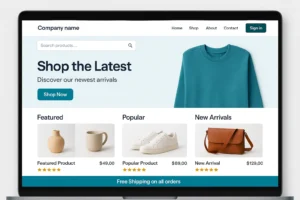
Dig deeper in Baymard Institute’s ecommerce usability study.
Elements of an Effective Homepage Design for Ecommerce
1. Hero Banner
The hero section is prime real estate.
- Feature an eye-catching promotion, a best-selling product, or a new arrival.
- Use a bold image, a catchy headline, and a brightly colored call-to-action button.
2. Navigation & Search
Simple menus help visitors find what they want.
- Always place a search bar where it can be spotted in less than three seconds.
3. Featured Products & Categories
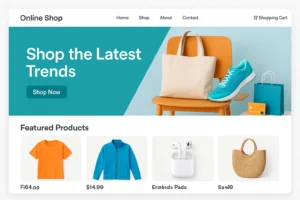
List the most popular items, seasonal favorites, or specially curated collections.
4. Social Proof & Trust Signals
Include recent customer ratings, media outlets that featured you, or security badges.
- These elements give new visitors the confidence to click “Buy Now.”
5. Footer Information
The footer is the quiet helper of the homepage.
- Gather links to contact info, shipping details, store policies, and help pages in an organized layout.
Best Practices for Homepage Design for Ecommerce
| Practice | Why It Matters | Example |
|---|---|---|
| Prioritize Mobile | Most U.S. users shop on phones | Use responsive layouts |
| Optimize Speed | Fast pages reduce bounce rates | Compress images |
| Balance Visuals & Text | Keep homepage clean, not cluttered | Use whitespace |
| Highlight Offers | Direct buyers to promotions | “Shop Now” banners |
Homepage Layout Ideas for Different Ecommerce Niches
- Fashion: Expansive lifestyle background, “New Arrivals” section, and footers featuring trending collections.
- Electronics: Large, bold CTAs, brief product specifications, and grids of bestsellers.
- Home Décor: Cozy imagery, color-themed category tiles, and a dedicated testimonial area.
- Subscription Boxes: Simple, animated walkthrough of the signup process.
Common Ecommerce Homepage Design Errors
- Popping consecutive pop-ups before any value is shown.
- Mixing blurry and high-quality images without a consistent style.
- Burying shipping details, return windows, or guarantee statements.
- Practically ignoring mobile visitors during design and testing.
Make your e-store layout less cluttered to get more sales.
Extra Tips for Your Online-Store Homepage
- Show personalized sections for users who come back.
- Add a video banner to quickly explain your brand.
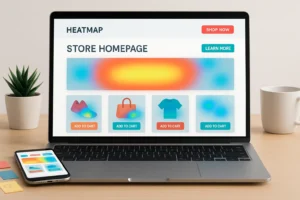
- Use heatmap software to find popular click spots.
- A/B test different buttons, banners, or main-category layouts.
SEO Must-Dos for Your Online-Store Homepage
- Use phrases like ecommerce homepage tips, online store layout, and eshop template in your headings and meta tags.
- Write alt text for all images.
- Make sure pages load in under three seconds.
- Craft clear, keyword-rich text for all internal links.
For in-depth info, check out product page SEO tips.
Tools for Building a Great Ecommerce Homepage
| Tool | Purpose | Strengths |
| Shopify | Drag-and-drop homepage builder | User-friendly, integrated hosting |
| WooCommerce + Elementor | WordPress ecommerce page builder | High customization |
| Squarespace | Templates for online shops | Clean, modern layouts |
| Adobe XD / Figma | Wireframing & prototyping | Collaboration, design previews |
Case Studies: U.S. Brands with Best Ecommerce Homepage Design
- Glossier: Clean lines and a simple menu put products front and center.
- Warby Parker: Uses bold images and smart buttons to tell a product story.
- Allbirds: Green color and earth-toned illustrations highlight sustainability.
Look at their best ecommerce homepage examples to spark your ideas.
Future Trends in Homepage Design for Ecommerce
- Smart AI that shows products based on your interests.
- Fun little animations that keep users scrolling.
- Optional dark mode for easier nighttime shopping.
- Search by talking to your phone.
Explore these ecommerce website ideas to stay ahead.
The Psychology Behind Homepage Design for Ecommerce
A successful homepage design for ecommerce isn’t only about pretty pictures; it taps into human psychology. Color, typography, and layout influence how shoppers feel and act:
-
Color theory: Warm colors (orange, red) evoke urgency and excitement, while cool colors (blue, green) build trust. Choose a palette aligned with your brand personality.
-
Typography: Use clear, legible fonts. Headings should command attention while body text remains easy to scan.
-
Visual hierarchy: Guide visitors’ eyes from hero image → headline → CTA → featured products. Whitespace keeps information digestible.
Tip: A/B test headline sizes and button colors to discover what drives the highest clicks.
Conversion Rate Optimization (CRO) on the Homepage
Your homepage is prime real estate for conversions. Apply these CRO tactics:
-
Compelling CTAs – Use active phrases (“Shop New Arrivals,” “Get Yours Today”).
-
Prominent banners – Rotate seasonal offers without overwhelming visitors.
-
Simplified navigation – Too many links create friction. Keep menus focused.
-
Urgency cues – Countdown timers or limited-stock notices can encourage action.
-
Heatmap analysis – Tools like Hotjar reveal where users click or stop scrolling.
Well-planned CRO strategies can increase revenue by 20–40% for stores with solid traffic.
Accessibility & Compliance
Inclusivity builds trust and expands your audience. Integrate these elements into homepage design for ecommerce:
-
Use alt text for every image.
-
Maintain strong contrast between text and background.
-
Ensure full keyboard navigation.
-
Provide descriptive labels for form fields and search bars.
-
Follow WCAG guidelines to meet ADA compliance.
Accessible design also improves SEO, since search engines reward sites that are usable for all visitors.
Case Studies: High-Performing U.S. Ecommerce Homepages
1. Glossier – Clean hero banner with subtle animations. Featured products appear above the fold, and CTAs use persuasive language.
2. Warby Parker – Homepage storytelling emphasizes mission (“Buy a Pair, Give a Pair”) while showing top frames.
3. Allbirds – A warm, eco-friendly vibe matches its sustainable shoes; navigation is simple yet powerful.
4. Bombas – Uses a strong social-impact headline and “Shop Socks” button within 3 seconds of landing.
Each brand shows that smart homepage design for ecommerce blends branding with conversion goals.
Measuring Homepage Performance
To ensure design improvements work, track metrics:
| Metric | Why It Matters | Tools |
|---|---|---|
| Bounce Rate | Shows if visitors leave quickly | Google Analytics |
| Scroll Depth | Reveals how far users engage | Hotjar, Crazy Egg |
| Click Maps | Identify high/low-performing areas | Lucky Orange |
| Conversion Rate | Links design changes to sales | GA4, Mixpanel |
Regularly review analytics to decide which homepage elements need testing or optimization.
Expanded Future Trends in Homepage Design for Ecommerce
-
AI personalization: Homepages will display product recommendations based on shopper behavior.
-
Voice-enabled search: Shoppers will use assistants (“Find eco-friendly shoes”) directly on your site.
-
Dynamic storytelling: Parallax scrolling and micro-animations enhance brand narratives.
-
Sustainability badges: Display eco-certifications to meet conscious consumer demand.
-
One-click checkout widgets: Reduce friction by shortening the path to purchase.
Staying ahead of these ecommerce website ideas gives your store a competitive edge.
30-Point Action Checklist for Homepage Success
Use this as a quick reference when creating or auditing a homepage:
-
Define clear homepage goals.
-
Use high-quality hero images.
-
Craft a concise, benefit-driven headline.
-
Keep menus intuitive and short.
-
Add a visible search bar.
-
Place CTAs above the fold.
-
Feature top products or categories.
-
Display trust badges and reviews.
-
Include your unique selling proposition (USP).
-
Ensure mobile responsiveness.
-
Optimize loading speed (under 3 seconds).
-
Use descriptive URLs and meta tags.
-
Add alt text for images.
-
Offer clear shipping & return info.
-
Keep color schemes consistent.
-
Use readable typography.
-
Limit pop-ups to one per visit.
-
Add internal links to top pages.
-
Use video banners carefully.
-
Provide a simple newsletter signup.
-
Check accessibility with screen readers.
-
Install heatmaps for behavior insights.
-
A/B test banners and CTAs.
-
Monitor bounce rate and session time.
-
Update seasonal offers promptly.
-
Integrate live chat or chatbot help.
-
Back up homepage settings and images.
-
Revisit design every 6–12 months.
-
Study competitors’ homepage layouts.
-
Celebrate brand personality through visuals.
Top 15 Frequently Asked Questions About Homepage Design for Ecommerce
1. What is homepage design for ecommerce, and why is it so important?
Homepage design for ecommerce refers to the structure, layout, and aesthetics of your store’s landing page. It’s the first thing visitors see and plays a crucial role in branding, trust, and sales. A clean, fast, and mobile-friendly homepage can increase conversions, while a cluttered one can drive customers away.
2. How can I make the best ecommerce homepage design for U.S. shoppers?
To create the best ecommerce homepage design, focus on:
-
A compelling hero banner highlighting promotions or new arrivals.
-
Clear navigation and prominent search bar.
-
Featured products, categories, or collections above the fold.
-
Social proof, such as reviews or press mentions.
-
A concise footer with shipping info and customer support.
3. What elements should every homepage design for ecommerce include?
Essential features for a strong ecommerce design:
-
Logo and brand colors for identity.
-
Sticky header with menu and cart icon.
-
Hero image/video with CTA.
-
Sections for trending products or categories.
-
Trust badges and security seals.
-
Newsletter signup and quick links.
4. How does homepage design impact SEO and conversions?
A smart homepage design for ecommerce helps search engines crawl your site while keeping users engaged. Optimizing headings, alt text, and internal links boosts visibility. Fast loading speeds and a clear CTA path reduce bounce rate, which improves rankings and sales.
5. What are common mistakes in ecommerce homepage design?
Avoid:
-
Overloading pages with pop-ups or auto-play videos.
-
Using low-quality or mismatched images.
-
Hiding important policies like returns or shipping.
-
Neglecting mobile responsiveness.
Simplify your online shop design to maintain focus on key goals.
6. How can I personalize my homepage design for ecommerce?
Personalization can enhance ecommerce website ideas:
-
Show product recommendations based on browsing history.
-
Use geolocation to display regional promotions.
-
Highlight last-viewed items for returning visitors.
-
Offer personalized discounts via banners.
7. Which platforms are best for designing an ecommerce homepage?
Top choices for e store design:
-
Shopify: Drag-and-drop editor with responsive templates.
-
WooCommerce + Elementor: Flexible for WordPress users.
-
Squarespace: Ideal for sleek webdesign online shop layouts.
-
BigCommerce: Built-in tools for fast-growing stores.
8. How should I use colors and typography in ecommerce homepage design?
Colors and fonts set the tone:
-
Use 2–3 primary colors that align with your branding.
-
Reserve bold accents for CTAs or sale messages.
-
Choose legible typography; pair one headline font with a body font.
-
Maintain strong contrast for accessibility.
9. What role does mobile optimization play in homepage design for ecommerce?
Most U.S. shoppers browse on phones. Ensure:
-
Responsive layouts that adapt to all screen sizes.
-
Touch-friendly buttons.
-
Lightweight images for faster load times.
Mobile-first shopping site design reduces abandonment and improves SEO.
10. How do I test and improve homepage performance?
Measure:
-
Bounce and conversion rates with Google Analytics.
-
Click maps and scroll depth via Hotjar or Crazy Egg.
-
A/B testing on CTAs, banner messages, and layouts.
Regular analysis is key to refining retail web design.
11. How can homepage design support storytelling for an ecommerce brand?
Your homepage should tell a story:
-
Use a tagline or mission statement near the hero banner.
-
Combine lifestyle photography with product imagery.
-
Add a section about your brand’s values or sustainability.
Storytelling humanizes your e commerce design and creates loyalty.
12. What accessibility practices should be applied to ecommerce homepage design?
To make e commerce web designing inclusive:
-
Provide alt text for images.
-
Keep contrast high for readability.
-
Enable keyboard navigation.
-
Add ARIA labels for screen readers.
Compliance with ADA and WCAG standards also benefits SEO.
13. How can I feature promotions without overwhelming the homepage?
For effective diseño ecommerce:
-
Use a single hero banner for primary deals.
-
Create smaller “mini-banners” for secondary offers.
-
Rotate promotions with sliders carefully—limit to 2–3 slides.
-
Ensure CTAs remain visible and clear.
14. What are the latest trends in homepage design for ecommerce?
Innovations include:
-
AI-powered product recommendations.
-
AR previews (e.g., furniture in a customer’s home).
-
Voice-search functionality built into shopping site design.
-
Micro-animations for hover effects or progress bars.
-
Dark mode options for user comfort.
These ecommerce website ideas give a modern touch.
15. How do I create a homepage maintenance checklist?
To keep your homepage design for ecommerce fresh:
-
Review banners and CTAs weekly.
-
Update hero images seasonally.
-
Monitor page speed after adding new elements.
-
Recheck mobile responsiveness.
-
Ensure all internal links remain active.
-
Back up homepage settings regularly.
Conclusion: Crafting a Homepage That Converts
A well-planned homepage for ecommerce is your online shop’s powerhouse. Combining smart layout, fast load speed, stunning visuals, and clear buttons lets your page tell the brand story, earn customer trust, and lead shoppers straight to the cart.
Try out these homepage design for ecommerce tactics, monitor your analytics, and adjust your layout to keep customers browsing and buying.
How to Start a Ecommerce Business: A Complete Beginner’s Guide
Fast Summary
- Design should be clean, work on mobile, and load quickly.
- Highlight a hero image, product categories, and trust markers.
- Use A/B tests to fine-tune buttons and page structure.
- Follow SEO and accessibility standards for your homepage.
- Check leading brands for ideas in retail web design and shopping site design.